


LG ThinQ
4.319.25K Reviews
App Specs
- Version
- Varies with Device
- Updated On
- License
- Free
- Downloads
- 100,000,000+
- Developer
- LG Electronics, Inc.
- Categories
- Lifestyle
- Platform
- Android, iOS
Screenshots
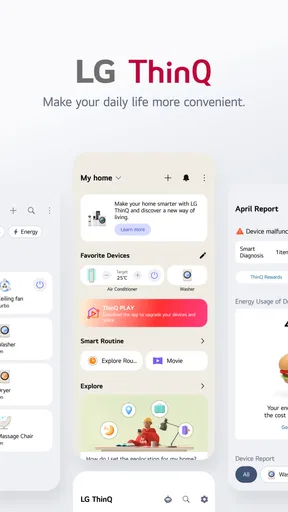
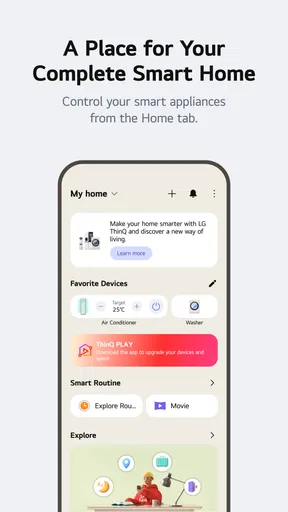
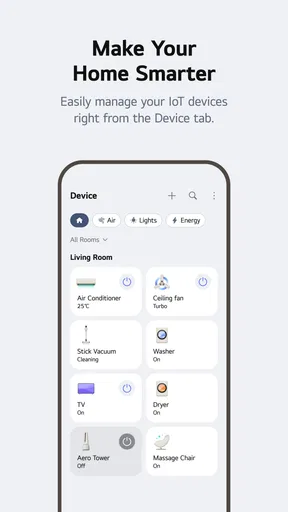
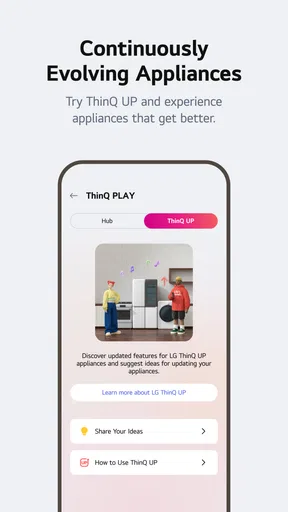
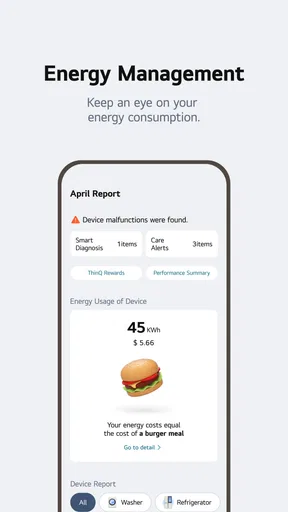
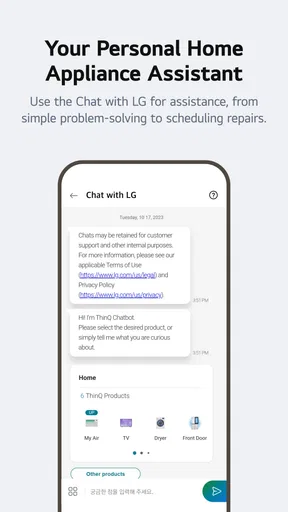
 Analysis by AppCompare
I judge a connected-home app less by how many controls it puts on a screen than by whether it helps when I’m away from the appliance. That is the practical promise of LG ThinQ: a Lifestyle app from LG Electronics, Inc. that brings compatible LG devices into a single mobile experience. It is free, rated for Everyone, and has a 4.3 average from around 1.2 million ratings, so it has clearly become a familiar option for many households. The useful question is whether that convenience fits the way you actually use your home.
When the network is part of the routine
Connectivity is central to the experience, not just a setup detail. When the phone, home network, and appliance are communicating properly, checking a device or receiving a notice can save a walk across the house. But a remote command is only helpful if the connection is dependable at that moment. I would treat ThinQ as a convenient way to interact with supported equipment, not as a guarantee that every control will respond instantly in every room or situation.
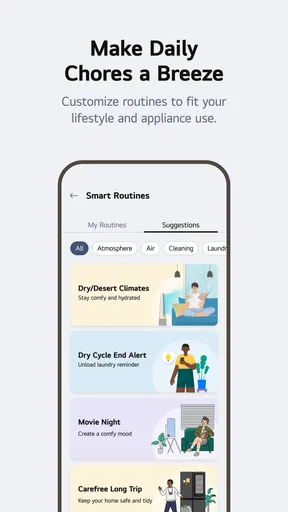
That distinction matters for schedules, too. A planned action can make a routine feel effortless, but schedules are most useful when they suit the appliance and your real habits. I’d start with one simple recurring task, then see whether it behaves as expected before relying on a more involved routine. If a task is time-critical, I would still check the appliance itself rather than assume a phone notification or remote action has completed it.
Guides and Analysis on LG ThinQ
Using it away from the appliance
The strongest case for a phone-based hub is being somewhere else when a household task needs attention. A laundry-complete alert, for example, can help me move a load along while I’m in another room or out running an errand. A reminder about an air filter can also be useful because it turns a maintenance task into something easier to notice amid a busy day. These are modest conveniences, but they are more meaningful than opening an app just to look at a dashboard.
There is a trade-off: phone alerts can add noise if every device sends updates that you do not act on. I’d keep notifications focused on events that change what I do, then review the rest of the app when needed. The app makes most sense for someone who wants to check or manage LG equipment from a phone; if you rarely use mobile controls and prefer buttons on the appliance, a separate hub may add little to your routine.
What happens when a command does not work?
Slow responses are a real point of friction. If a control appears stuck, I would first check whether the phone has a usable connection, then confirm the appliance is powered and connected before repeatedly tapping the same command. Repeating requests can make it harder to tell whether the first one eventually took effect. For anything involving heat, cooling, or a running cycle, checking the appliance directly is the safer way to resolve uncertainty.
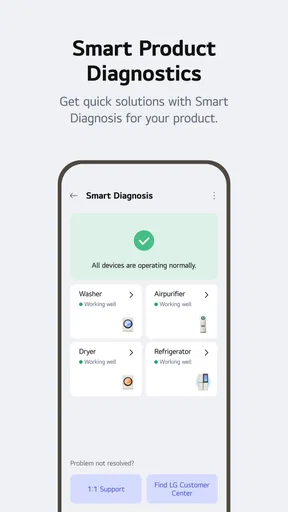
Smart Diagnosis is a useful idea for narrowing down an appliance problem, but I see it as a first check rather than a substitute for every repair. It may help me understand what to do next; it does not make a mechanical issue disappear. Likewise, compatibility can be a hurdle with older equipment. Before building a household routine around the app, I would confirm that the specific LG appliance I plan to use is supported and that its available controls match what I expect.
Worth Reading Before You Choose

QuizzLand Review: A Good Fit for Short Trivia Breaks, Not Every Player

Basketball Stars: Multiplayer Is Fast, but Can It Recover When Matches Go Wrong?

WEBTOON Turns Phone Updates Into a Better Reading Routine

Link to Windows Runs on Shared Habits, Not Social Feeds

How Alibaba.com Dominates the B2B Marketplace

Metro's Quiet Rise: Redefining Mobile Communication
Keeping the setup manageable
Adding devices one at a time is a more sensible approach than trying to connect the whole home in one sitting. It gives me a chance to learn which controls are genuinely useful, whether alerts are worth keeping on, and where the app feels slow. It also makes troubleshooting simpler: if something stops responding, I have a clearer idea which recent change might be involved.
ThinQ is less compelling if your household relies on devices from several brands and you want one app to control everything. A general smart-home platform may be a better central dashboard in that case, while the manufacturer’s own app can still be useful for device-specific functions. ThinQ’s advantage is its focus on LG products; that focus is also its limit. I would choose it for a home already built around compatible LG appliances, not as a reason by itself to replace equipment that works fine.
How LG ThinQ fits everyday life
Picture getting home later than planned while a laundry cycle is running. A completion alert can tell you when there is something to handle, rather than making you guess or keep checking the machine. On another day, you might use a schedule to have a supported appliance follow a regular routine. The value is not that the app turns every chore into automation; it is that a few well-chosen checks and reminders can reduce small interruptions.
My practical advice is to choose one appliance and one task as a trial. Connect it, learn where its status and controls appear, and pay attention to whether the app’s notifications help or distract. Only then decide whether it is worth adding more devices. This also answers a common concern about setup: the app is most approachable when you treat it as a device-by-device tool rather than expecting a complete smart home to organize itself.
LG ThinQ is a Lifestyle app by LG Electronics, Inc., and its reach is reflected in over 100 million installs. It is free, carries an Everyone age rating, and version 5.1.22220 requires Android 9 or later. The app has been available since November 19, 2015, and its large audience makes it a well-established choice, though popularity alone cannot tell you whether a particular appliance will work the way you want.
On mobile, its convenience depends on context. A phone is a natural place to receive a laundry notice or check an appliance while moving through the day, but it is not always the quickest way to make a change when you are standing right beside the machine. In that moment, the appliance’s own controls may be simpler. I would use the app to support a routine, not force every interaction through a screen.
I also would not build a plan around remote access without first checking how the app and a particular device behave in my home. Network quality can vary from room to room, and a command that is useful at home may be less dependable when the phone or appliance has a weak connection. Trying a low-stakes control first is a better test than relying on remote operation for something urgent.
For households already using compatible LG appliances, ThinQ can bring useful checks, notifications, schedules, and diagnostic help together. If you want a broad, brand-neutral controller, or you prefer to keep appliance use entirely local and simple, another approach may suit you better. I’d recommend trying ThinQ when its specific LG controls solve a task you already have; I would not add complexity just for the idea of a smarter home.
Getting Started with LG ThinQ
Installing the LG ThinQ app is as easy as pie. Available on both Android and iOS, you can download it faster than you can say "smart home." Once you fire it up, you’re greeted with a sleek interface that’s pretty intuitive. I mean, even if you’re not a tech whiz, you’ll find your way around in no time.
Features that Make Life Easier
Let’s talk features because that’s where the magic happens. The app allows you to connect and control all your LG smart devices from one place. Whether it’s your fridge, washing machine, or air conditioner, everything’s just a tap away. And the best part? It supports voice control through Google Assistant and Alexa. So, next time you're juggling groceries, just tell your fridge to cool it.
Another cool feature is the Smart Diagnosis. Imagine your washing machine acting up, and instead of calling a technician, you simply use the app to figure out what’s wrong. It’s like having a little tech genie in your pocket.
Customizing Your Smart Home Experience
Customization is the name of the game here. With the app, you can set schedules for your devices, ensuring everything runs smoothly even if you forget. Want your coffee ready when you wake up? Schedule it. Need your house cooled before you get home? Set it up. It’s all about making life convenient.
Plus, the app’s notifications keep you in the loop. Whether it’s a reminder to clean the air filter or a notice that your laundry is done, you’ll never miss a beat.
What Could Be Better?
Now, no app is perfect, right? While LG ThinQ is impressive, I did notice it can be a bit sluggish at times. It’s not a deal-breaker, but it’s something to keep in mind. Also, some users have mentioned compatibility issues with older devices, so make sure your gadgets are up to date.
And while the app is user-friendly, a little more customization in the UI wouldn’t hurt. But hey, nothing a future update can’t fix!
Final Thoughts
In a nutshell, LG ThinQ is a powerhouse for those looking to streamline their smart home experience. It’s packed with features that genuinely make life easier. Sure, it has its quirks, but the pros definitely outweigh the cons. If you’re all about efficiency and convenience, this app is worth checking out.
So, if you’re ready to step into the future of home automation, you know what to do. Give LG ThinQ a whirl and watch as your home becomes smarter, one device at a time.
Pros
- Seamless integration with LG devices.
- User-friendly interface for easy navigation.
- Remote control features enhance convenience.
- Regular updates improve functionality.
- Voice command support for hands-free use.
Cons
- Limited compatibility with non-LG devices.
- Occasional connectivity issues reported.
- Some features require premium LG models.
- Initial setup can be time-consuming.
- Notifications can be overly frequent.
FAQs for LG ThinQ
What is LG ThinQ and how does it work?
LG ThinQ is a smart home platform designed to seamlessly connect and control LG smart devices, including appliances and electronics. It works by using Wi-Fi or Bluetooth to link devices, allowing users to manage them through the app. Features include remote control, scheduling, and monitoring of device performance.
Is LG ThinQ compatible with non-LG devices?
While LG ThinQ is primarily designed for LG products, it does offer some compatibility with third-party smart home devices through integrations like Google Assistant and Amazon Alexa. However, full functionality is best experienced with LG devices, so it’s advisable to check specific compatibility before purchasing.
What are the security measures in place for LG ThinQ?
LG ThinQ employs several security measures to protect user data and ensure safe operation. This includes encryption of data transmissions, secure account management, and regular software updates to address vulnerabilities. Users can enhance security by using strong passwords and enabling two-factor authentication.
Can LG ThinQ operate offline?
LG ThinQ requires an internet connection for full functionality, including remote access and updates. Some basic features, like local device control, might work offline via Bluetooth, but to utilize the app's complete capabilities, a stable Wi-Fi connection is essential.
How user-friendly is the LG ThinQ app interface?
The LG ThinQ app is designed with a user-friendly interface that simplifies device management. It features intuitive navigation, clear labeling, and helpful tutorials. The app is suitable for users of all tech levels, though initial setup may require some learning for those new to smart home technology.


